
Create and engage with Podcasts that matter
Tutorials
Audacity
Audacity is a free open-source program that will work on both Windows and Macs and can be downloaded here, https://www.audacityteam.org/.
Audacity Help Links
Noise Reduction – remove ambient noise in the recording room (filter settings)
Normalize – apply constant amount of gain to bring peaks up to a target level
Equalization – boost/reduce selected frequencies for more natural sound
Compressor – reduce loud sounds and increase soft sounds for overall smoothness (settings)
Envelope Tool – control volume changes over time
Adobe Audition
Adobe Audition is part of the Adobe Creative Suite tools which most NY6 campuses license. Watch the video below for a very quick overview.
Ensemble Anthem
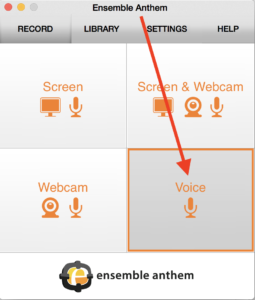
Ensemble’s Anthem User Guide guides one though the setup from installing the software to using different recording workflows. While the video below demonstrates Anthem primarily for video capture, nearly the same instructions apply when one selects Voice from the Anthem Record menu quadrant. The only difference is to select the mic only for audio recording and not Screen & Webcam.


